
📝 Guestbook
Messages and mentions from across the web. You can mention this site via Webmention. You can also mention @fabio@manganiello.blog on the Fediverse.
Reactions
How to interact with this page
Webmentions
To interact via Webmentions, send an activity that references this URL from a platform that supports Webmentions, such as Lemmy, WordPress with Webmention plugins, or any IndieWeb-compatible site.
ActivityPub
- Follow @fabio@manganiello.blog on your ActivityPub platform (e.g. Mastodon, Misskey, Pleroma, Lemmy).
- Mention @fabio@manganiello.blog in a post to feature on the Guestbook.

A science, engineering and music geek who likes to build open-source things that solve problems.
🖥️ Tech
I have been a citizen of the Internet since the early 2000s, and a passionate self-hoster since about day 1 (my adventure started with hosting my personal Website and phpBB a spare Pentium 1 under my bed, with Slackware Linux installed from floppy disks).
Some of my tech contributions, in no particular order.
📚 Academic
-
Computer Vision with Maker Tech (ISBN 978-1-4842-6820-9), published by Springer in 2021. A hands-on introduction to machine learning and computer vision using DIY tech, RaspberryPis and thermal cameras.
-
Framework and Models for Multistep Attack Detection, 2011, published in the International Journal of Security and Its Applications.
-
Identification of correlated network intrusion alerts, 2011, published by IEEE in the Third International Workshop on Cyberspace Safety and Security.
-
Multistep Attack Detection and Alert Correlation in Intrusion Detection Systems, 2011, published in Information Security and Assurance (ISA 2011).
-
Machine learning algorithms for clustering and correlating security alerts in Intrusion Detection Systems, 2010, my Master's Thesis.
💼 Professional
A non-exhaustive list of some of my employers over the years, in no particular order:
- ✈️ Booking.com (current employer)
- 💵 Adyen
- 🚢 Flexport
- ✨ expert.ai
🔓 Open-Source
| 📂 Project | ✏️ Description | |
|---|---|---|
⚙️ Platypush

|
Platypush is an ambitious general-purpose platform for automation, IoT, media streaming and more that has kept me busy since 2015. Or, as some call it, Home Assistant's geeker brother. It provides hundreds of supported integrations, covering everything from MQTT to cameras, from smart lights to media services, from Arduino and ESP8266 devices to machine learning models, from messaging platforms to calendars, and more. It also enables users to configure arbitrarily complex routines on events through either Python or YAML event handlers. A powerful web extension that allows you to run routines directly from your browser is also available. | |
▶️ Songhive

|
Songhive is a general-purpose platform for music streaming, sales, collection uploads and syncs, with support for ActivityPub, Webmentions, Subsonic API-compatible music players, multiple streaming services and storages, Mopidy, podcasts, live streaming and more. | |
📖 Madblog

|
Madblog is a powerful blogging engine that natively supports Webmentions and federation over ActivityPub. It's a strongly opinionated platform based on simplicity. No databases, no JavaScript, no write APIs, no authentication, no migrations: your blog is a folder of Markdown files. You can run Madblog on top of an Obsidian vault, a Nextcloud shared directory, a git clone, and much more. It is also the blogging platform powering the page you are reading right now. |
|
📍 GPSTracker

|
A full-featured self-hosted Web app to store your GPS data points, render them on timelines, search for activities by geographical area or time, and run statistics on them. A crossing between Google Maps Timeline and Foursquare's Swarm, but self-hosted and Web-based. | |
✏️ nvim-http

|
A plugin to run HTTP request files in nvim. Inspired by (and compatible with) the HTTP requests plugins provided by JetBrains and VSCode. | |
🌐 Pubby

|
A batteries-included library with a simple API that allows you to easily plug ActivityPub support into your website. It power's Madblog's ActivityPub integration. | |
🔗 Webmentions

|
A batteries-included library with a simple API that allows you to easily plug Webmentions support into your website. It power's Madblog's Webmentions integration. | |
🎤 Micmon

|
A general-purpose Python library and set of tools for audio detection through Fourier analysis and Tensorflow. | |
∿ Theremin

|
A contactless, hands-in-air digital implementation of a Theremin musical instrument through a Leap Motion device. | |
👣 Snort_AIPreproc

|
A machine learning module for the intrusion detection system Snort that removes the noise from the logs, clusters similar alerts together, finds common causal links between alerts and predicts the next step in a multi-step attack scenario. | |
fsom

|
A C library for managing Self-Organizing Maps. | |
fkmeans

|
A C library to perform K-means clustering. | |
🗣️ Voxifera

|
(Probably) one of the earliest examples of voice assistants I'm aware of - I built it back in 2008 but it's largely discontinued now. |
📑 Blogs
- Personal blog (also federated at
@fabio@manganiello.blog) - Platypush blog (also federated at
@blog@platypush.tech)
🏆 Awards
- Hackernoon 2020 contributor of the year (IoT)
- Hackernoon 2022 contributor of the year (Distributed Systems)
- Hackernoon 2022 contributor of the year (Proof of Stake)
🎵 Music
I occasionally perform and record music - mostly guitar-based, with a few excursions into electronic, orchestral and ethnic music.
You can check my releases on:
- @fabio@manganiello.music, which you can also follow through Mastodon or other Fediverse-based implementations (it's federated through Songhive)
- Spotify
- Tidal
✊ Activism
Technology
The formation of giant tech oligopolies with such a huge influence over society is a spectacular systemic failure that must be undone at all costs, and regulation must prevent the conditions that lead to such a state.
You'll probably find me at some somewhere advocating for open-source, open data access, privacy, decentralization and self-hosted solutions. Or talk about #platypush or #madblog.
I have an academic and professional background rooted in big data and machine learning, and I embrace #ai as a powerful tool in our hands. But I strongly oppose the disproportionate concentration of power, the unaccountability and the rotten business models that drive much of today's AI.
Politics and society
- Antifascist to the core.
- Billionaires and oligopolies are a threat to democracy.
- Supporting self-determination against all forms of colonialism, imperialism and racism.
🇺🇦 🇵🇸 🇹🇼 🇬🇱 🇸🇩
I am part of the gaza-verified.org initiative, whose purpose is to help people from Gaza being verified and onboarded on social media and protect their voices.
I have built the gaza-verified archive as an effort to permanently archive their voices and memories.
🌳 Life
Italian based in the Netherlands who is still struggling with his Dutch.
Among the things I like to do when not at a keyboard or a guitar:
- 🛹 Roll my skate
- 🏄 Chase waves
- 🍺 Enjoy craft beer
- 👪 Raise a new geek

Please help my child before he breaks down even more…
@gvenema @maltita @aral @fabio @simon_brooke @tekul @velvetmolotov @chielk @mynameistillian @Shibanarchiste @franciswashere @zvinj @autocade @lashman @nemo @jpp45 @apenkop @deuza42 @amans @delsaulnier @heatherrosejones @eldadoinquieto @Pine_Affinity @kathimmel @RFancio @raphaellakay @DailyGaza @fedipourgaza @mutualaid@fedigroups.social @mutualaid@ovo.st @disability @lgbtq @nodami @calebwill @DenisCOVIDinfoguy @davidculley @Nozika
Good morning… I start my day with a heavy heart; my children have woken up and there's nothing to give them. Hunger takes precedence over everything else in our lives. Any small act of kindness today could mean a meal to sustain them… or even a smile to restore their hope. @gvenema @maltita @aral @fabio @simon_brooke @tekul @velvetmolotov @chielk @mynameistillian @Shibanarchiste @franciswashere @zvinj @autocade @lashman @nemo @jpp45 @apenkop @deuza42 @amans https://chuffed.org/project/177026-help-hadeels-family-survive-in-gaza

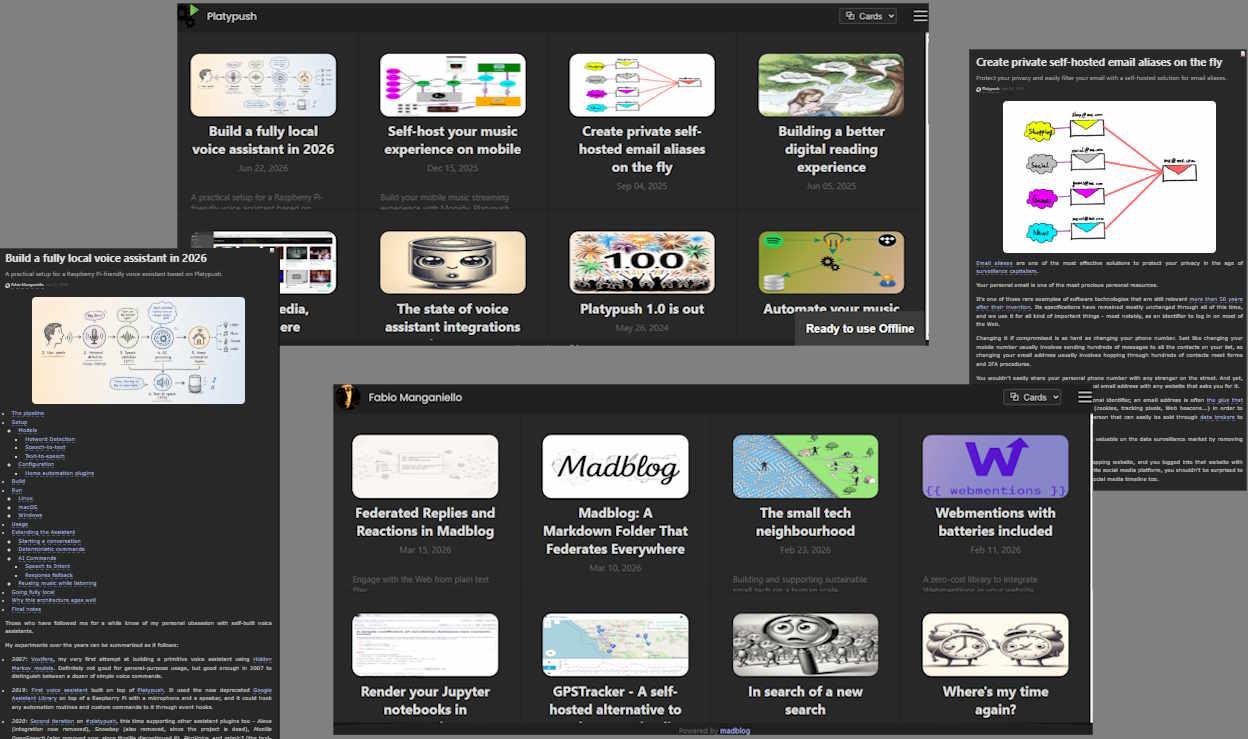
Dove trovare esempi di Madblog? Fabio Manganiello al @devconf
- blog.fabiomanganiello.com, il blog di Fabio
- Handle: @fabio@manganiello.blog
- blog.platypush.tech, il blog di Platypush (il mio progetto principale)
- Handle: @blog
- fabiomanganiello.com, il sito Web principale di @fabio@manganiello.eu
- che utilizza Madblog in modalità aggregatore, e ritorna articoli da tutti iblog di Fabio

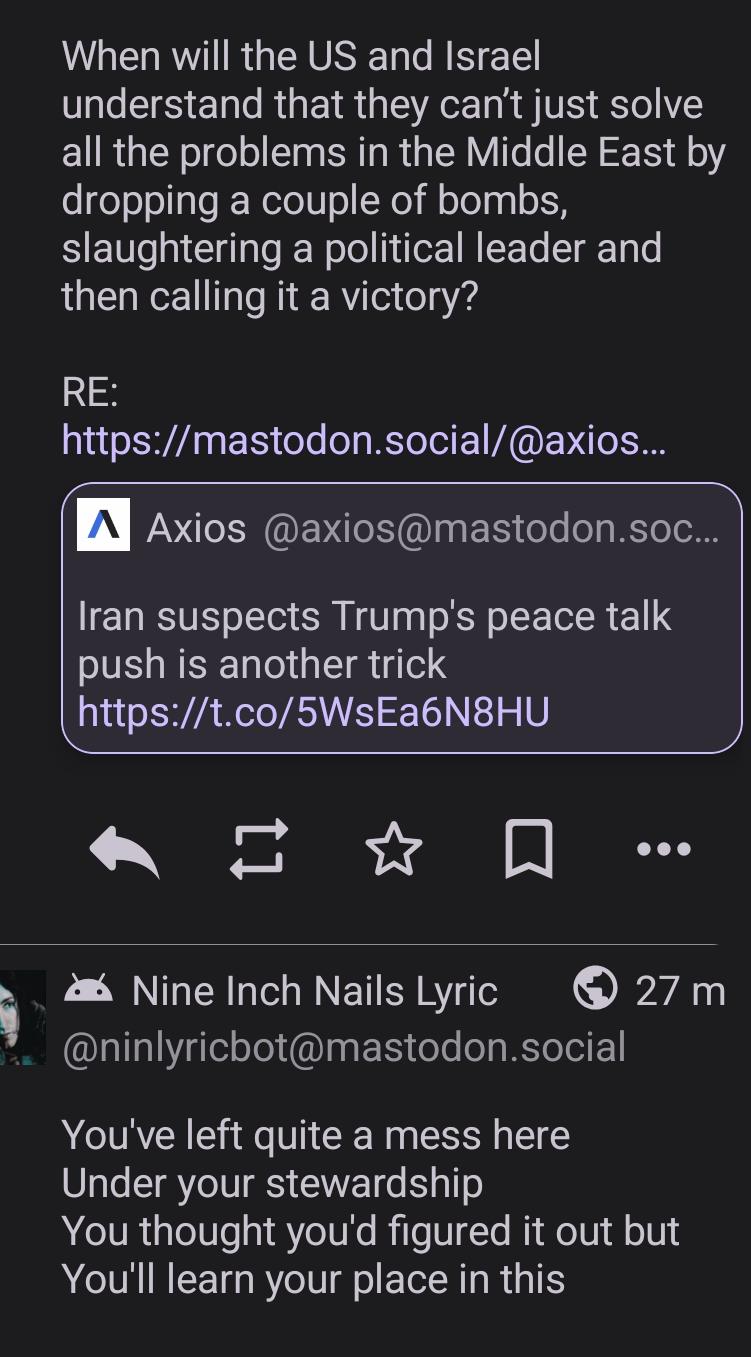
Highly appropriate Nine Inch Nails lyrics appeared in just the right spot on my timeline 😁🤘
Thanks @fabio @ninlyricbot
Madblog is founded on a simple principle: a blog is just a collection of #markdown files in a folder. No databases, no logins, no client-side bloat — just files.
The recently implemented support for both Webmentions and ActivityPub add an extra appeal to this approach: now those text files can federate, they can send mentions to Wordpress blogs or Mastodon accounts, and you can visualize mentions, comments and reactions from other corners of the Web directly under your articles.
But after receiving in the past few days a bunch of reactions on my blog that I couldn't interact with, which forced me to fall back on my standard Fediverse account to send replies and likes, I've decided to take the "everything is a file" philosophy a step further.
Now from #madblog you can also reply to comments and react to posts across the Fediverse - all from plain text files in your content folder.
Replying to Comments
When someone comments on your article from Mastodon or another ActivityPub-compatible services, their message appears on your blog.
Now you can also respond directly from your blog.
Or you can reply to any other post on the Fediverse or mention anyone, without those posts cluttering your blog's front page (I've learned to avoid this fatal design mistake made by e.g. Medium).
How it works
Create a Markdown file under replies/<article-slug>/:
 [//]: # (reply-to: https://mastodon.social/@alice/123456789)

Thanks for the kind words, Alice! I'm glad the tutorial helped.

@alice@mastodon.social
Save the file, and Madblog automatically:
- Publishes your reply to the Fediverse as a threaded response
- Notifies Alice on her Mastodon instance
- Displays the reply on your blog, nested under her original comment
Your reply lives in your content folder. Just like with your articles, you can version replies and reactions on git, synchronize them over SyncThing or Nextcloud Notes, or run some analysis scripts on them that would just operate on text files.
Replying to replies
Conversations can go as deep as you want. Reply to a reply by pointing reply-to at the previous message's URL:
 [//]: # (reply-to: https://mastodon.social/@alice/123456790)

Great question! I'll write a follow-up post about that.

@alice@mastodon.social
The threading is preserved both on your blog and across the Fediverse.
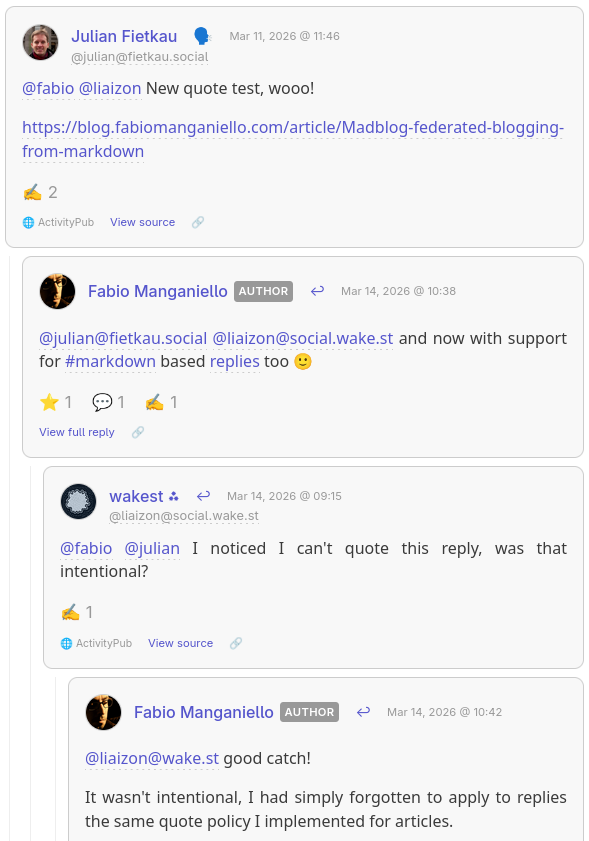
(I hope that @julian@fietkau.social and @liaizon@social.wake.st won't mind for using a screenshot from their conversation on my blog 🙂)
Remember to mention your mentions
An important implementation note: if you're replying to someone else's ActivityPub post, it's important that you also mention them in the reply, otherwise your reply will be rendered under their comment but they may not be notified.
Usually you don't have to worry about this on Mastodon because the UI will automatically pre-fill the participating accounts in a sub-thread when you hit Reply.
But this is something to keep in mind when your posts are just text files.
Your replies are articles in their own right
Even though anything under replies/ won't appear on your blog's home page, it doesn't mean that it must be rendered just like a humble rectangle in a crowded comments section.
By clicking View full reply you get redirected to a separate page where the reply is rendered as a blog article, and its comments section consists in the sub-tree of the reactions that spawned from that specific reply.
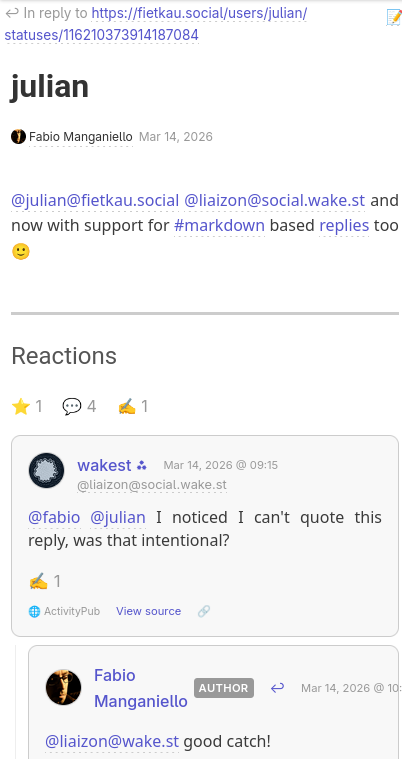
Liking Posts
Sometimes a reply is too much — you just want to show appreciation. Now you can "like" any post on the Fediverse with a simple metadata header.
Standalone likes
Create a file under replies/ with just a like-of header:
[//]: # (like-of: https://mastodon.social/@bob/987654321)
This publishes a Like activity to the Fediverse. Bob sees the notification,
and your blog records the interaction.
Like and comment
Want to like and say something? Combine both:
 [//]: # (like-of: https://mastodon.social/@bob/987654321)
 [//]: # (reply-to: https://mastodon.social/@bob/987654321)

This is such a great point! Bookmarking for later.

@bob@mastodon.social
Bob gets both the like and your reply as a threaded response.
Unlisted Posts
Not everything needs to appear on your blog's front page. Files under replies/ without reply-to and like-of headers become "unlisted" posts — they're published to the Fediverse but don't clutter your blog index.
Perfect for quick thoughts, threads, or conversations that don't warrant a full article.
 [//]: # (title: Thoughts of the day)

Quick thought: I've been experimenting with writing all my Fediverse posts
as Markdown files. It's oddly satisfying to `git log` my social media history.
Guestbook Replies
Your blog's guestbook works the same way. Reply to guestbook entries by placing files under replies/_guestbook/:
 [//]: # (reply-to: https://someone.blog/mention/123)

@alice@example.com welcome! Thanks for stopping by.
Editing and Deleting
Changed your mind? Edit the file and an Update activity is sent. Delete the file and your reply is removed from the Fediverse too.
Accidentally liked something? Remove the like-of line (or delete the file) and an Undo Like is published.
Your content, your rules.
Getting Started
- Enable ActivityPub in your
config.yaml:
link: https://blog.example.com
enable_activitypub: true
activitypub_username: blog

# Only specify these if you want your ActivityPub domain to be different from your blog domain
# activitypub_link: https://example.com
# activitypub_domain: example.com
- Install Madblog
- From
pip:
pip install madblog
- From Docker:
docker pull quay.io/blacklight/madblog
- Run Madblog from your Markdown folder (it is recommended that your articles are stored under
<data-dir>/markdown):
- From a
pipinstallation:
madblog /path/to/data
- From Docker:
docker run -it \
  -p 8000:8000 \
  -v "/path/to/config.yaml:/etc/madblog/config.yaml" \
  -v "/path/to/data:/data" \
  quay.io/blacklight/madblog
- Any text file you create under
markdown/becomes a blog article. Any text file you create underreplies/becomes an unlisted post, a reply or a like reaction.
Check the README for detailed configuration options.
Happy blogging!

#ActivityPub support in #Madblog
I am glad to announce that Madblog has now officially joined the #Fediverse family.
Madblog has already supported #Webmentions for the past couple of weeks, allowing your blog posts to be mentioned by other sites with Webmentions support (WordPress, Lemmy, HackerNews…) and get those mentions directly rendered on your page.
It now adds ActivityPub support too, using #Pubby, another little Python library that I’ve put together myself (just like Webmentions) as a mean to quickly plug ActivityPub support to any Python Web app.
Webmentions and Pubby follow similar principles and implement a similar API, and you can easily use them to add federation support to your existing Web applications - a single bind_webmentions or bind_activitypub call to your existing Flask/FastAPI/Tornado application should suffice for most of the cases.
Madblog may have now become the easiest way to publish a federated blog - and perhaps the only way that doesn’t require a database, everything is based on plain Markdown files.
If you have a registered domain and a certificate, then hosting your federated blog is now just a matter of:
mkdir -p ~/madblog/markdown
cat <<EOF > ~/madblog/markdown/hello-world.md

This is my first post on [Madblog](https://git.fabiomanganiello.com/madblog)!
EOF

docker run -it \
  -p 8000:8000 \
  -v "$HOME/madblog:/data" \
  quay.io/blacklight/madblog
And Markdown files can be hosted wherever you like - a Git folder, an Obsidian Vault, a Nextcloud Notes installation, a folder on your phone synchronized over SyncThing…
Federation support is also at a quite advanced state compared to e.g. #WriteFreely. It currently supports:
Interactions rendered on the articles: if you like, boost, quote or reply to an article, all interactions are rendered directly at the bottom of the article (interactions with WriteFreely through federated accounts were kind of lost in the void instead)
Guestbook support (optional): mentions to the federated Madblog handle that are not in response to articles are now rendered on a separate
/guestbookrouteEmail notifications: all interactions can have email notifications
Support for quotes, also on Mastodon
Support for mentions, just drop a
@joe@example.comin your Markdown file and Joe will get a notificationSupport for hashtag federation
Support for split-domain configurations, you can host your blog on
blog.example.combut have a Fediverse handle like@blog@example.com. Search by direct post URL on Mastodon will work with both casesSupport for custom profile fields, all rendered on Mastodon, with verification support
Support for moderation, either through blocklist or allowlist, with support for rules on handles/usernames, URLs, domains or regular expressions
A partial (but comprehensive for the provided features) implementation of the Mastodon API
If you want you can follow both the profiles of my blogs - they are now both federated:
My personal blog: @fabio (it used to run WriteFreely before, so if you followed it you may need to unfollow it and re-follow it)
The #Platypush blog: @blog
https://blog.fabiomanganiello.com/article/Madblog-federated-blogging-from-markdown

@fabio@manganiello.eu @fabio@manganiello.blog @blog This is not just a video—it's a glimpse into our everyday life in Gaza.
https://kafeneio.social/@AmirGaza/117003837982746429

@fabio@manganiello.eu @fabio@manganiello.blog @blog
My orphaned daughter and I, who lost her father before she was born, rely on your kindness to survive during this genocide. My little girl has just turned one year old, and every day is a struggle. Please help us if you can. Every dollar makes a difference. 🙏💔


@fabio@manganiello.eu @fabio@manganiello.blog @blog 💔 Every little bit of support means so much to my family.

@fabio@manganiello.eu @fabio@manganiello.blog
Please, Mr. Fabo, find a solution for this account. It's restricted, and I can't get through to anyone. I've spoken to you many times about helping me get the restriction lifted.

@fabio@manganiello.eu @fabio@manganiello.blog @blog Please help my family get basic necessities and food. Please, even 100£ would be enough for me and my family.
https://chuffed.org/project/149031-give-waleeds-family-a-chance-to-live
I started working on Madblog a few years ago.
I wanted a simple blogging platform that I could run from my own Markdown files. No intermediaries. No bloated UI. No JavaScript. No databases and migration scripts. No insecure plugins. Just a git folder, an Obsidian vault or a synchronized SyncThing directory, and the ability to create and modify content by simply writing text files, wherever I am.
Drop a Markdown file in the directory, and it's live. Edit it, and the changes propagate. Delete it, and it's gone.
It's been running my personal blog and the Platypush blog for a while now.
With the new release, #madblog now gets a new superpower: it supports federation, interactions and comments both through:
- Webmentions - already implemented some weeks ago, you can also check out the previous blog article
- ActivityPub
Webmentions allow your site to mention and be mentioned by other sites that also implement them - like any WordPress blog with the Webmention plugin, or link aggregators like Lemmy or HackerNews. Interactions with any of your pages will be visible under them.
#activitypub support allows Madblog to fully federate with Mastodon, Pleroma, Misskey, Friendica or any other #fediverse instance. It turns your blog into a federated handle that can be followed by anyone on the Fediverse. It gives you the ability to mention people on the Fediverse directly from your text files, and get replies to your articles directly from Mastodon, get your articles boosted, shared and quoted like any other Mastodon post.
Demos
These blogs are powered by Madblog:
- blog.fabiomanganiello.com — Fediverse handle: @fabio@manganiello.blog
- blog.platypush.tech — Fediverse handle: @blog@platypush.tech
You can follow them from Mastodon (or any other Fediverse client), reply to articles directly from your instance, boost them, or quote them. You can also interact via Webmentions: link to an article from your own site, and if your site supports Webmentions, the mention will show up as a response on the original post. These blogs also have a Guestbook — mention the blog's Fediverse handle or send a Webmention to the home page, and your message appears on a public guest registry.
How Does It Compare?
If you've looked into federated blogging before, you've likely come across a few options:
- WriteFreely is probably the closest alternative — a minimalist, Go-based platform with ActivityPub support. It's well-designed, but it uses a database (SQLite or MySQL), has its own (very minimal) editor, and doesn't support Webmentions. Additionally, it lacks many features that are deal-breakers for me.
- No export of all the content to Markdown, nor ability to run my blog from my Nextcloud Notes folder or Obsidian vault.
- No support for LaTeX or Mermaid diagrams.
- No support for federated interactions - any interaction with your articles on the Fediverse is simply lost.
- The UI is minimalist and not necessarily bad, but not even sufficiently curated for something like a blog (narrow width, Serif fonts not optimized for legibility, the settings and admin panels are a mess...).
- No support for moderation / content blocking.
-
No support for federated hashtags.
-
WordPress with ActivityPub and Webmention plugins can technically do what Madblog does, but it's a full CMS with a database, a theme engine, a plugin ecosystem, and a much larger attack surface. If all you need is a blog, it's overkill.
-
Plume and Friendica offer blogging with federation, but they're full social platforms, not lightweight publishing tools.
Madblog sits in a different niche: it's closer to a static-site generator that happens to speak federation protocols. It implements a workflow like "write Markdown, push to server, syndicate everywhere".
Getting Started
Docker Quickstart
mkdir -p ~/madblog/markdown
cat <<EOF > ~/madblog/markdown/hello-world.md

This is my first post on [Madblog](https://git.fabiomanganiello.com/madblog)!
EOF

docker run -it \
  -p 8000:8000 \
  -v "$HOME/madblog:/data" \
  quay.io/blacklight/madblog
Open http://localhost:8000. That's it — you have a blog.
The default Docker image (quay.io/blacklight/madblog) is a minimal build (< 100 MB) that includes everything except LaTeX and Mermaid rendering. If you need those, build the full image from source:
git clone https://git.fabiomanganiello.com/madblog
cd madblog
docker build -f docker/full.Dockerfile -t madblog .
See the full Docker documentation for details on mounting config files and ActivityPub keys.
Markdown structure
Since there's no database or extra state files involved, the metadata of your articles is also stored in Markdown.
Some things (like title, description) can be inferred from the file name, headers of your files etc., creation date defaults to the creation timestamp of the file and author and language are inherited from your config.yaml.
A full customized header would look like this:
 [//]: # (title: Title of the article)
 [//]: # (description: Short description of the content)
 [//]: # (image: /img/some-header-image.png)
 [//]: # (author: Author Name <https://author.me>)
 [//]: # (author_photo: https://author.me/avatar.png)
 [//]: # (language: en-US)
 [//]: # (published: 2022-01-01)

...your Markdown content...
Key Configuration
Madblog reads configuration from a config.yaml in your content directory. Every option is also available as an environment variable with a MADBLOG_ prefix — handy for Docker or CI setups.
A minimal config to get started:
title: My Blog
description: Thoughts on tech and life
link: https://myblog.example.com
author: Your Name
Or purely via environment variables:
docker run -it \
  -p 8000:8000 \
  -e MADBLOG_TITLE="My Blog" \
  -e MADBLOG_LINK="https://myblog.example.com" \
  -e MADBLOG_AUTHOR="Your Name" \
  -v "$HOME/madblog:/data" \
  quay.io/blacklight/madblog
See config.example.yaml for the full reference.
It is advised to keep all of your Markdown content under
<data-dir>/markdown, especially if you enable federation, in order to keep the Markdown folder tidy from all the auxiliary files generated by Madblog.
Webmentions
Webmentions are the IndieWeb's answer to trackbacks and pingbacks — a W3C standard that lets websites notify each other when they link to one another. Madblog supports them natively, both inbound and outbound.
When someone links to one of your articles from a Webmention-capable site, your blog receives a notification and renders the mention as a response on the article page. Going the other way, when you link to an external URL in your Markdown and save the file, Madblog automatically discovers the target's Webmention endpoint and sends a notification — no manual step required. All mentions are stored as Markdown files under your content directory (mentions/incoming/<post-slug>/), so they're version-controllable and easy to inspect.
You can enable pending-mode for moderation (webmentions_default_status: pending), or use the blocklist/allowlist system to filter sources by domain, URL, or regex. Webmentions are enabled by default — if you're running Madblog locally for testing, set enable_webmentions: false to avoid sending real notifications to external sites.
ActivityPub Federation
ActivityPub is the protocol that powers the Fediverse — Mastodon, Pleroma, Misskey, and hundreds of other platforms. Madblog implements it as a first-class feature: enable it, and your blog becomes a Fediverse actor that people can follow, reply to, boost, and quote.
Enable it in your config:
enable_activitypub: true
activitypub_username: blog
activitypub_private_key_path: /path/to/private_key.pem
Madblog will generate an RSA keypair on first start if you don't provide one. Once enabled, your blog gets a Fediverse handle (@blog@yourdomain.com), a WebFinger endpoint for discovery, and a full ActivityPub actor profile. New and updated articles are automatically delivered to all followers' timelines.
Here's what federation looks like in practice:
- Receiving mentions: when someone mentions your blog's Fediverse handle in a public post (not as a reply to a specific article), the mention shows up on your Guestbook page.
- Receiving replies, likes, boosts, and quotes: interactions targeting a specific article are rendered below that article — replies as threaded comments, likes/boosts/quotes as counters and cards. All stored as JSON files on disk.
- Sending mentions: just write the fully-qualified handle in your Markdown (
@alice@mastodon.social) and save the file. Madblog resolves the actor via WebFinger and delivers a proper ActivityPubMentiontag — the mentioned user gets a notification on their instance. - Federated hashtags: hashtags in your articles (
#Python,#Fediverse) are included as ActivityPubHashtagtags in the published object. Followers who track those hashtags on their instance will see your posts in their filtered feeds. - Custom profile fields: configure additional profile metadata (verified links, donation pages, git repos) that show up on your actor's profile as seen from Mastodon and other Fediverse clients:
yaml
  activitypub_profile_fields:
    Git repository: <https://git.example.com/myblog>
    Donate: <https://liberapay.com/myprofile>
The federation layer also exposes a read-only subset of the Mastodon API, so Mastodon-compatible clients and crawlers can discover the instance, look up the actor, list published statuses, and search for content — with no extra configuration.
Madblog also supports advanced ActivityPub features like split-domain setups (e.g. your blog at blog.example.com but your Fediverse handle at @blog@example.com), configurable object types (Note for inline rendering on Mastodon vs. Article for link-card previews), and quote policies (FEP-044f, so Mastodon users can quote your articles too).
LaTeX and Mermaid
Madblog supports server-side rendering of LaTeX equations and Mermaid diagrams directly in your Markdown files — no client-side JavaScript required.
LaTeX uses latex + dvipng under the hood. Inline expressions use conventional LaTeX markers:
The Pythagorean theorem states that \(c^2 = a^2 + b^2\).

$$
E = mc^2
$$
Mermaid diagrams use standard fenced code blocks. Both light and dark theme variants are rendered at build time and switch automatically based on the reader's color scheme:
 ```mermaid
 graph LR
     A[Write Markdown] --> B[Madblog renders it]
     B --> C[Fediverse sees it]
 ```
Install Mermaid support with pip install "madblog[mermaid]" or use the full Docker image. Rendered output is cached, so only the first render of each block is slow.
Tags and Categories
Tag your articles with hashtags — either in the metadata header or directly in the body text:
[//]: # (tags: #python, #fediverse, #blogging)

# My Article

This post is about #Python and the #Fediverse.
Madblog builds a tag index at /tags, with per-tag pages at /tags/<tag>. Hashtags from incoming Webmentions are also indexed. Folders in your content directory act as categories — if you organize files into subdirectories, the home page groups articles by folder.
Feed Syndication
Madblog generates both RSS and Atom feeds at /feed.rss and /feed.atom. You can control whether feeds include full article content or just descriptions (short_feed: true), and limit the number of entries (max_entries_per_feed: 10). limit and offset parameters are also supported for pagination.
Aggregator Mode
Madblog can also pull in external RSS/Atom feeds and render them alongside your own posts on the home page — useful for affiliated blogs, or even as a self-hosted feed reader:
external_feeds:
  - https://friendsblog.example.com/feed.atom
  - https://colleaguesblog.example.com/feed.atom
Guestbook
The guestbook (/guestbook) is a dedicated page that aggregates public interactions — Webmentions targeting the home page and Fediverse mentions of your blog actor that aren't replies to specific articles. Think of it as a public guest registry, or a lo-fi comment section for your blog as a whole. Visitors can leave a message by mentioning your Fediverse handle or sending a Webmention. It can be disabled via enable_guestbook=0.
View Modes
The home page supports three layouts:
cards(default) — a responsive grid of article cards with imageslist— a compact list with titles and datesfull— a scrollable, WordPress-like view with full article content inline
Set it in your config (view_mode: cards) or override at runtime with ?view=list.
Moderation
Madblog ships with a flexible moderation system that applies to both Webmentions and ActivityPub interactions. You can run in blocklist mode (reject specific actors) or allowlist mode (accept only specific actors), with pattern matching by domain, URL, ActivityPub handle, or regex:
blocked_actors:
  - spammer.example.com
  - "@troll@evil.social"
  - /spam-ring\.example\..*/
Moderation rules also apply retroactively — interactions already stored are filtered at render time. Blocked ActivityPub followers are excluded from fan-out delivery and hidden from the public follower count, but their records are preserved so they can be automatically reinstated if you change your rules.
Email Notifications
Configure SMTP settings and Madblog will notify you by email whenever a new Webmention or ActivityPub interaction arrives — likes, boosts, replies, mentions, and quotes:
author_email: you@example.com
smtp_server: smtp.example.com
smtp_username: you@example.com
smtp_password: your-password
Progressive Web App
Madblog is installable as a PWA, with offline access and a native-like experience on supported devices. A service worker handles stale-while-revalidate caching with background sync for retries.
Raw Markdown Access
Append .md to any article URL to get the raw Markdown source:
https://myblog.example.com/article/my-post.md
Useful for readers who prefer plain text, or for tools that consume Markdown directly.
Reusable Libraries
Two key subsystems of Madblog have been extracted into standalone, reusable Python libraries. If you're building a Python web application and want to add decentralized federation support, you can use them directly — no need to adopt Madblog itself.
Webmentions
Webmentions is a general-purpose Python library for sending and receiving Webmentions. It comes with framework adapters for FastAPI, Flask, and Tornado, pluggable storage backends (SQLAlchemy or custom), filesystem monitoring for auto-sending mentions when files change, full microformats2 parsing, and built-in HTML rendering for displaying mentions on your pages.
Adding Webmentions to a FastAPI app:
from fastapi import FastAPI
from webmentions import WebmentionsHandler
from webmentions.storage.adapters.db import init_db_storage
from webmentions.server.adapters.fastapi import bind_webmentions

app = FastAPI()
storage = init_db_storage(engine="sqlite:////tmp/webmentions.db")
handler = WebmentionsHandler(storage=storage, base_url="https://example.com")
bind_webmentions(app, handler)
That's it — your app now has a /webmentions endpoint for receiving mentions,
a Link header advertising it on every response, and a storage layer for
persisting them. See the
full documentation
for details on sending mentions, custom storage, moderation, and rendering.
Pubby
Pubby is a general-purpose Python library for adding ActivityPub federation to any web application. It handles inbox processing, outbox delivery with concurrent fan-out, HTTP Signatures, WebFinger/NodeInfo discovery, interaction storage, a Mastodon-compatible API, and framework adapters for FastAPI, Flask, and Tornado.
Adding ActivityPub to a FastAPI app:
from fastapi import FastAPI
from pubby import ActivityPubHandler, Object
from pubby.crypto import generate_rsa_keypair
from pubby.storage.adapters.db import init_db_storage
from pubby.server.adapters.fastapi import bind_activitypub

app = FastAPI()
storage = init_db_storage("sqlite:////tmp/pubby.db")
private_key, _ = generate_rsa_keypair()

handler = ActivityPubHandler(
    storage=storage,
    actor_config={
        "base_url": "https://example.com",
        "username": "blog",
        "name": "My Blog",
        "summary": "A blog with ActivityPub support",
    },
    private_key=private_key,
)

bind_activitypub(app, handler)

# Publish a post to all followers
handler.publish_object(Object(
    id="https://example.com/posts/hello",
    type="Note",
    content="<p>Hello from the Fediverse!</p>",
    url="https://example.com/posts/hello",
    attributed_to="https://example.com/ap/actor",
))
Optionally, you can also expose a Mastodon-compatible API so that Mastodon clients and crawlers can discover your instance and browse statuses:
from pubby.server.adapters.fastapi_mastodon import bind_mastodon_api

bind_mastodon_api(
    app,
    handler,
    title="My Blog",
    description="A blog with ActivityPub support",
)
Both libraries follow the same design philosophy: provide the protocol plumbing so you can wire it into your existing application with minimal ceremony. Storage is pluggable (SQLAlchemy, file-based, or bring-your-own), framework binding is a single function call, and the core logic is framework-agnostic. See the full documentation for Pubby and Webmentions.
Links
Madblog is open-source under the AGPL-3.0-only license. The source code, issue tracker, and full documentation are available at git.fabiomanganiello.com/madblog.

I have been a quite strong advocate of Webmentions for a long time.
The idea is simple and powerful, and very consistent with the decentralized POSSE approach to content syndication.
Suppose that Alice finds an interesting article on Bob's website, at https://bob.com/article.
She writes a comment about it on her own website, at https://alice.com/comment.
If both Alice's and Bob's websites support Webmentions, then their websites will both advertise an e.g. POST /webmentions endpoint.
When Alice publishes her comment, her website will send a Webmention to Bob's website, with the source URL (https://alice.com/comment) and the target URL (https://bob.com/article).
Bob's website will receive the Webmention, verify that the source URL actually mentions the target URL, and then display the comment on the article page.
No 3rd-party commenting system. No intermediate services. No social media login buttons. No ad-hoc comment storage and moderation solutions. Just a simple, decentralized, peer-to-peer mechanism based on existing Web standards.
This is an alternative (and complementary) approach to federation mechanisms like ActivityPub, which are very powerful but also quite complex to implement, as implementations must deal with concepts such as actors, relays, followers, inboxes, outboxes, and so on.
It is purely peer-to-peer, based on existing Web infrastructure, and with no intermediate actors or services.
Moreover, thanks to Microformats, Webmentions can be used to share any kind of content, not just comments: likes, reactions, RSVPs, media, locations, events, and so on.
However, while the concept is simple, implementing Webmentions support from scratch can be a bit cumbersome, especially if you want to do it right and support all the semantic elements.
I have thus proceeded to implement a simple Python library (but more bindings are on the backlog) that can be easily integrated into any website, and that takes care of all the details of the Webmentions protocol implementation. You only have to worry about writing good semantic HTML, and rendering Webmention objects in your pages.
Quick start
If you use FastAPI or Flask, serve your website as static files and you're ok to use an SQLAlchemy engine to store Webmentions, you can get started in a few lines of code.
pip install "webmentions[db,file,fastapi]"
# For Flask bindings
pip install "webmentions[db,file,flask]"
Base implementation:
import os

from webmentions import WebmentionsHandler
from webmentions.storage.adapters.db import init_db_storage
from webmentions.server.adapters.fastapi import bind_webmentions
from webmentions.storage.adapters.file import FileSystemMonitor

# This should match the public URL of your website
base_url = "https://example.com"

# The directory that serves your static articles/posts.
# HTML, Markdown and plain text are supported
static_dir = "/srv/html/articles"

# A function that takes a path to a created/modified/deleted text/* file
# and maps it to a URL on the Web server to be used as the Webmention source
def path_to_url(path: str) -> str:
    # Convert path (absolute) to a path relative to static_dir
    # and drop the extension.
    # For example, /srv/http/articles/2022/01/01/article.md
    # becomes /2022/01/01/article
    path = os.path.relpath(path, static_dir).rsplit(".", 1)[0].lstrip("/")
    # Convert the path to a URL on the Web server
    # For example, /2022/01/01/article
    # becomes https://example.com/articles/2022/01/01/article
    return f"{base_url.rstrip('/')}/articles/{path}"

##### For FastAPI

from fastapi import FastAPI
from webmentions.server.adapters.fastapi import bind_webmentions

app = FastAPI()

##### For Flask

from flask import Flask
from webmentions.server.adapters.flask import bind_webmentions

app = Flask(__name__)

# ...Initialize your Web app as usual...

# Create a Webmention handler

handler = WebmentionsHandler(
    storage=init_db_storage(engine="sqlite:////tmp/webmentions.db"),
    base_url=base_url,
)

# Bind Webmentions to your app
bind_webmentions(app, handler)

# Create and start the filesystem monitor before running your app
with FileSystemMonitor(
    root_dir=static_dir,
    handler=handler,
    file_to_url_mapper=path_to_url,
) as monitor:
    app.run(...)
This will:
- Register a
POST /webmentionsendpoint to receive Webmentions - Advertise the Webmentions endpoint in every
text/*response provided by the server - Expose a
GET /webmentionsendpoint to list Webmentions (takesresourceURL anddirection(inorout) query parameters) - Store Webmentions in a database (using SQLAlchemy)
- Monitor
static_dirfor changes to HTML or text files, automatically parse them to extract Webmention targets and sources, and send Webmentions when new targets are found
Generic Web framework setup
If you don't use FastAPI or Flask, or you want a higher degree of customization, you can still use the library by implementing and advertising your own Webmentions endpoint, which in turn will simply call WebmentionsHandler.process_incoming_webmention.
You will also have advertise the Webmentions endpoint in your responses, either through:
- A
Linkheader (with a value in the format<https://example.com/webmentions>; rel="webmention") - A
<link>or<a>element in the HTML head or body (in the format<link rel="webmention" href="https://example.com/webmentions">)
An example is provided in the documentation.
Generic storage setup
If you don't want to use SQLAlchemy, you can implement your own storage by implementing the WebmentionsStorage interface (namely the store_webmention, retrieve_webmentions, and delete_webmention methods), then pass that to the WebmentionsHandler constructor.
An example is provided in the documentation.
Manual handling of outgoing Webmentions
The FileSystemMonitor approach is quite convenient if you serve your website (or a least the mentionable parts of it) as static files.
However, if you have a more dynamic website (with posts and comments stored on e.g. a database), or you want to have more control over when Webmentions are sent, you can also call the WebmentionsHandler.process_outgoing_webmentions method whenever a post or comment is published, updated or deleted, to trigger the sending of Webmentions to the referenced targets.
An example is provided in the documentation.
Subscribe to mention events
You may want to add your custom callbacks when a Webmention is sent or received - for example to send notifications to your users when some of their content is mentioned, or to keep track of the number of mentions sent by your pages, or to perform any automated moderation or filtering when mentions are processed etc.
This can be easily achieved by providing custom callback functions (on_mention_processed and on_mention_deleted) to the WebmentionsHandler constructor, and both take a single Webmention object as a parameter.
An example is provided in the documentation.
Filtering and moderation
This library is intentionally agnostic about filtering and moderation, but it provides you with the means to implement your own filtering and moderation logic through the on_mention_processed and on_mention_deleted callbacks.
By default all received Webmentions are stored with WebmentionStatus.CONFIRMED status.
This can be changed by setting the initial_mention_status parameter of the WebmentionsHandler constructor to WebmentionStatus.PENDING, which will cause all received Webmentions to be stored but not visible on the website until they are manually confirmed by an administrator.
You can then use the on_mention_processed callback to implement your own logic to either notify the administrator of new pending mentions, or to automatically confirm them based on some criteria.
A minimal example is provided in the documentation.
Make your pages mentionable
Without good semantic HTML, Webmentions will be quite minimal. They will still work, but they will probably be rendered simply as a source URL and a creation timestamp.
The Webmention specification is intentionally simple, in that the POST endpoint only expects a source URL and a target URL. The rest of the information about the mention (the author, the content, the type of mention, any attachments, and so on) is all derived from the source URL, by parsing the HTML of the source page and extracting the relevant Microformats.
While the Microformats2 specification is quite flexible and a work-in-progress, there are a few basic elements whose usage is recommended to make the most out of Webmentions.
A complete example with a semantic-aware HTML article is provided in the documentation.
Rendering mentions on your pages
Finally, the last step is to render the received Webmentions on your pages.
A
WebmentionsHandler.render_webmentions
helper is provided to automatically generate a safe pre-rendered and reasonably
styled (but customizable through CSS variables) Markup object, which you can
then render in your templates. Example:
from fastapi import FastAPI
from fastapi.templating import Jinja2Templates
from webmentions import WebmentionsHandler
from webmentions.server.adapters.fastapi import bind_webmentions

base_url = "https://example.com"
app = FastAPI()
handler = WebmentionsHandler(...)
bind_webmentions(app, handler)

# ...

@app.get("/articles/{article_id}")
def article(request, article_id: int):
    templates = Jinja2Templates(directory="templates")
    mentions = handler.retrieve_webmentions(
      f"{base_url}/articles/{article_id}",
      WebmentionDirection.IN,
    )

    rendered_mentions = handler.render_webmentions(mentions)
    return templates.TemplateResponse(
      "article.html",
      {
        "request": request,
        "article_id": article_id,
        "mentions": rendered_mentions,
      },
    )
Where article.html is a Jinja template that looks like this:
<!doctype html>
<html>
  <head>
    <title>Example article</title>
  </head>
  <body>
    <main>
      <article class="h-entry">
        <h1 class="p-name">Example article</h1>
        <time class="dt-published" datetime="2026-02-07T21:03:00+01:00">
          Feb 7, 2026
        </time>
        <div class="e-content">
          <p>Your article content goes here.</p>
        </div>
      </article>

      {{ mentions }}
    </div>
  </body>
</html>
More details are provided in the documentation.
For more customizing rendering, a reference Jinja template is also provided in the documentation.
Current implementations
So far the library is used in madblog, a minimal zero-database Markdown-based blogging engine I maintain, which powers both my personal blog and the Platypush blog.
You can see some Webmentions in action on some of my blog posts.
And, if you include a link to any article of mine in your website, and your website supports Webmentions (for example there is a Wordpress plugin), you should see the mention appear in the comments of the article page.