Madblog: A Markdown Folder That Federates Everywhere
A lightweight blogging engine based on text files, with native Fediverse and IndieWeb support

I started working on Madblog a few years ago.
I wanted a simple blogging platform that I could run from my own Markdown files. No intermediaries. No bloated UI. No JavaScript. No databases and migration scripts. No insecure plugins. Just a git folder, an Obsidian vault or a synchronized SyncThing directory, and the ability to create and modify content by simply writing text files, wherever I am.
Drop a Markdown file in the directory, and it's live. Edit it, and the changes propagate. Delete it, and it's gone.
It's been running my personal blog and the Platypush blog for a while now.
With the new release, #madblog now gets a new superpower: it supports federation, interactions and comments both through:
- Webmentions - already implemented some weeks ago, you can also check out the previous blog article
- ActivityPub
Webmentions allow your site to mention and be mentioned by other sites that also implement them - like any WordPress blog with the Webmention plugin, or link aggregators like Lemmy or HackerNews. Interactions with any of your pages will be visible under them.
#activitypub support allows Madblog to fully federate with Mastodon, Pleroma, Misskey, Friendica or any other #fediverse instance. It turns your blog into a federated handle that can be followed by anyone on the Fediverse. It gives you the ability to mention people on the Fediverse directly from your text files, and get replies to your articles directly from Mastodon, get your articles boosted, shared and quoted like any other Mastodon post.
Demos
These blogs are powered by Madblog:
- blog.fabiomanganiello.com — Fediverse handle: @fabio@manganiello.blog
- blog.platypush.tech — Fediverse handle: @blog@platypush.tech
You can follow them from Mastodon (or any other Fediverse client), reply to articles directly from your instance, boost them, or quote them. You can also interact via Webmentions: link to an article from your own site, and if your site supports Webmentions, the mention will show up as a response on the original post. These blogs also have a Guestbook — mention the blog's Fediverse handle or send a Webmention to the home page, and your message appears on a public guest registry.
How Does It Compare?
If you've looked into federated blogging before, you've likely come across a few options:
-
WriteFreely is probably the closest alternative — a minimalist, Go-based platform with ActivityPub support. It's well-designed, but it uses a database (SQLite or MySQL), has its own (very minimal) editor, and doesn't support Webmentions. Additionally, it lacks many features that are deal-breakers for me.
- No export of all the content to Markdown, nor ability to run my blog from my Nextcloud Notes folder or Obsidian vault.
- No support for LaTeX or Mermaid diagrams.
- No support for federated interactions - any interaction with your articles on the Fediverse is simply lost.
- The UI is minimalist and not necessarily bad, but not even sufficiently curated for something like a blog (narrow width, Serif fonts not optimized for legibility, the settings and admin panels are a mess...).
- No support for moderation / content blocking.
- No support for federated hashtags.
-
WordPress with ActivityPub and Webmention plugins can technically do what Madblog does, but it's a full CMS with a database, a theme engine, a plugin ecosystem, and a much larger attack surface. If all you need is a blog, it's overkill.
-
Plume and Friendica offer blogging with federation, but they're full social platforms, not lightweight publishing tools.
Madblog sits in a different niche: it's closer to a static-site generator that happens to speak federation protocols. It implements a workflow like "write Markdown, push to server, syndicate everywhere".
Getting Started
Docker Quickstart
mkdir -p ~/madblog/markdown
cat <<EOF > ~/madblog/markdown/hello-world.md

This is my first post on [Madblog](https://git.fabiomanganiello.com/madblog)!
EOF

docker run -it \
  -p 8000:8000 \
  -v "$HOME/madblog:/data" \
  quay.io/blacklight/madblog
Open http://localhost:8000. That's it — you have a blog.
The default Docker image (quay.io/blacklight/madblog) is a minimal build (< 100 MB) that includes everything except LaTeX and Mermaid rendering. If you need those, build the full image from source:
git clone https://git.fabiomanganiello.com/madblog
cd madblog
docker build -f docker/full.Dockerfile -t madblog .
See the full Docker documentation for details on mounting config files and ActivityPub keys.
Markdown structure
Since there's no database or extra state files involved, the metadata of your articles is also stored in Markdown.
Some things (like title, description) can be inferred from the file name, headers of your files etc., creation date defaults to the creation timestamp of the file and author and language are inherited from your config.yaml.
A full customized header would look like this:
 [//]: # (title: Title of the article)
 [//]: # (description: Short description of the content)
 [//]: # (image: /img/some-header-image.png)
 [//]: # (author: Author Name <https://author.me>)
 [//]: # (author_photo: https://author.me/avatar.png)
 [//]: # (language: en-US)
 [//]: # (published: 2022-01-01)

...your Markdown content...
Key Configuration
Madblog reads configuration from a config.yaml in your content directory. Every option is also available as an environment variable with a MADBLOG_ prefix — handy for Docker or CI setups.
A minimal config to get started:
title: My Blog
description: Thoughts on tech and life
link: https://myblog.example.com
author: Your Name
Or purely via environment variables:
docker run -it \
  -p 8000:8000 \
  -e MADBLOG_TITLE="My Blog" \
  -e MADBLOG_LINK="https://myblog.example.com" \
  -e MADBLOG_AUTHOR="Your Name" \
  -v "$HOME/madblog:/data" \
  quay.io/blacklight/madblog
See config.example.yaml for the full reference.
It is advised to keep all of your Markdown content under
<data-dir>/markdown, especially if you enable federation, in order to keep the Markdown folder tidy from all the auxiliary files generated by Madblog.
Webmentions
Webmentions are the IndieWeb's answer to trackbacks and pingbacks — a W3C standard that lets websites notify each other when they link to one another. Madblog supports them natively, both inbound and outbound.
When someone links to one of your articles from a Webmention-capable site, your blog receives a notification and renders the mention as a response on the article page. Going the other way, when you link to an external URL in your Markdown and save the file, Madblog automatically discovers the target's Webmention endpoint and sends a notification — no manual step required. All mentions are stored as Markdown files under your content directory (mentions/incoming/<post-slug>/), so they're version-controllable and easy to inspect.
You can enable pending-mode for moderation (webmentions_default_status: pending), or use the blocklist/allowlist system to filter sources by domain, URL, or regex. Webmentions are enabled by default — if you're running Madblog locally for testing, set enable_webmentions: false to avoid sending real notifications to external sites.
ActivityPub Federation
ActivityPub is the protocol that powers the Fediverse — Mastodon, Pleroma, Misskey, and hundreds of other platforms. Madblog implements it as a first-class feature: enable it, and your blog becomes a Fediverse actor that people can follow, reply to, boost, and quote.
Enable it in your config:
enable_activitypub: true
activitypub_username: blog
activitypub_private_key_path: /path/to/private_key.pem
Madblog will generate an RSA keypair on first start if you don't provide one. Once enabled, your blog gets a Fediverse handle (@blog@yourdomain.com), a WebFinger endpoint for discovery, and a full ActivityPub actor profile. New and updated articles are automatically delivered to all followers' timelines.
Here's what federation looks like in practice:
- Receiving mentions: when someone mentions your blog's Fediverse handle in a public post (not as a reply to a specific article), the mention shows up on your Guestbook page.
- Receiving replies, likes, boosts, and quotes: interactions targeting a specific article are rendered below that article — replies as threaded comments, likes/boosts/quotes as counters and cards. All stored as JSON files on disk.
- Sending mentions: just write the fully-qualified handle in your Markdown (
@alice@mastodon.social) and save the file. Madblog resolves the actor via WebFinger and delivers a proper ActivityPubMentiontag — the mentioned user gets a notification on their instance. - Federated hashtags: hashtags in your articles (
#Python,#Fediverse) are included as ActivityPubHashtagtags in the published object. Followers who track those hashtags on their instance will see your posts in their filtered feeds. -
Custom profile fields: configure additional profile metadata (verified links, donation pages, git repos) that show up on your actor's profile as seen from Mastodon and other Fediverse clients:
yaml
activitypub_profile_fields:
  Git repository: <https://git.example.com/myblog>
  Donate: <https://liberapay.com/myprofile>
The federation layer also exposes a read-only subset of the Mastodon API, so Mastodon-compatible clients and crawlers can discover the instance, look up the actor, list published statuses, and search for content — with no extra configuration.
Madblog also supports advanced ActivityPub features like split-domain setups (e.g. your blog at blog.example.com but your Fediverse handle at @blog@example.com), configurable object types (Note for inline rendering on Mastodon vs. Article for link-card previews), and quote policies (FEP-044f, so Mastodon users can quote your articles too).
LaTeX and Mermaid
Madblog supports server-side rendering of LaTeX equations and Mermaid diagrams directly in your Markdown files — no client-side JavaScript required.
LaTeX uses latex + dvipng under the hood. Inline expressions use conventional LaTeX markers:
The Pythagorean theorem states that \(c^2 = a^2 + b^2\).

$$
E = mc^2
$$
Mermaid diagrams use standard fenced code blocks. Both light and dark theme variants are rendered at build time and switch automatically based on the reader's color scheme:
 ```mermaid
 graph LR
     A[Write Markdown] --> B[Madblog renders it]
     B --> C[Fediverse sees it]
 ```
Install Mermaid support with pip install "madblog[mermaid]" or use the full Docker image. Rendered output is cached, so only the first render of each block is slow.
Tags and Categories
Tag your articles with hashtags — either in the metadata header or directly in the body text:
[//]: # (tags: #python, #fediverse, #blogging)

# My Article

This post is about #Python and the #Fediverse.
Madblog builds a tag index at /tags, with per-tag pages at /tags/<tag>. Hashtags from incoming Webmentions are also indexed. Folders in your content directory act as categories — if you organize files into subdirectories, the home page groups articles by folder.
Feed Syndication
Madblog generates both RSS and Atom feeds at /feed.rss and /feed.atom. You can control whether feeds include full article content or just descriptions (short_feed: true), and limit the number of entries (max_entries_per_feed: 10). limit and offset parameters are also supported for pagination.
Aggregator Mode
Madblog can also pull in external RSS/Atom feeds and render them alongside your own posts on the home page — useful for affiliated blogs, or even as a self-hosted feed reader:
external_feeds:
  - https://friendsblog.example.com/feed.atom
  - https://colleaguesblog.example.com/feed.atom
Guestbook
The guestbook (/guestbook) is a dedicated page that aggregates public interactions — Webmentions targeting the home page and Fediverse mentions of your blog actor that aren't replies to specific articles. Think of it as a public guest registry, or a lo-fi comment section for your blog as a whole. Visitors can leave a message by mentioning your Fediverse handle or sending a Webmention. It can be disabled via enable_guestbook=0.
View Modes
The home page supports three layouts:
cards(default) — a responsive grid of article cards with imageslist— a compact list with titles and datesfull— a scrollable, WordPress-like view with full article content inline
Set it in your config (view_mode: cards) or override at runtime with ?view=list.
Moderation
Madblog ships with a flexible moderation system that applies to both Webmentions and ActivityPub interactions. You can run in blocklist mode (reject specific actors) or allowlist mode (accept only specific actors), with pattern matching by domain, URL, ActivityPub handle, or regex:
blocked_actors:
  - spammer.example.com
  - "@troll@evil.social"
  - /spam-ring\.example\..*/
Moderation rules also apply retroactively — interactions already stored are filtered at render time. Blocked ActivityPub followers are excluded from fan-out delivery and hidden from the public follower count, but their records are preserved so they can be automatically reinstated if you change your rules.
Email Notifications
Configure SMTP settings and Madblog will notify you by email whenever a new Webmention or ActivityPub interaction arrives — likes, boosts, replies, mentions, and quotes:
author_email: you@example.com
smtp_server: smtp.example.com
smtp_username: you@example.com
smtp_password: your-password
Progressive Web App
Madblog is installable as a PWA, with offline access and a native-like experience on supported devices. A service worker handles stale-while-revalidate caching with background sync for retries.
Raw Markdown Access
Append .md to any article URL to get the raw Markdown source:
https://myblog.example.com/article/my-post.md
Useful for readers who prefer plain text, or for tools that consume Markdown directly.
Reusable Libraries
Two key subsystems of Madblog have been extracted into standalone, reusable Python libraries. If you're building a Python web application and want to add decentralized federation support, you can use them directly — no need to adopt Madblog itself.
Webmentions
Webmentions is a general-purpose Python library for sending and receiving Webmentions. It comes with framework adapters for FastAPI, Flask, and Tornado, pluggable storage backends (SQLAlchemy or custom), filesystem monitoring for auto-sending mentions when files change, full microformats2 parsing, and built-in HTML rendering for displaying mentions on your pages.
Adding Webmentions to a FastAPI app:
from fastapi import FastAPI
from webmentions import WebmentionsHandler
from webmentions.storage.adapters.db import init_db_storage
from webmentions.server.adapters.fastapi import bind_webmentions

app = FastAPI()
storage = init_db_storage(engine="sqlite:////tmp/webmentions.db")
handler = WebmentionsHandler(storage=storage, base_url="https://example.com")
bind_webmentions(app, handler)
That's it — your app now has a /webmentions endpoint for receiving mentions,
a Link header advertising it on every response, and a storage layer for
persisting them. See the
full documentation
for details on sending mentions, custom storage, moderation, and rendering.
Pubby
Pubby is a general-purpose Python library for adding ActivityPub federation to any web application. It handles inbox processing, outbox delivery with concurrent fan-out, HTTP Signatures, WebFinger/NodeInfo discovery, interaction storage, a Mastodon-compatible API, and framework adapters for FastAPI, Flask, and Tornado.
Adding ActivityPub to a FastAPI app:
from fastapi import FastAPI
from pubby import ActivityPubHandler, Object
from pubby.crypto import generate_rsa_keypair
from pubby.storage.adapters.db import init_db_storage
from pubby.server.adapters.fastapi import bind_activitypub

app = FastAPI()
storage = init_db_storage("sqlite:////tmp/pubby.db")
private_key, _ = generate_rsa_keypair()

handler = ActivityPubHandler(
    storage=storage,
    actor_config={
        "base_url": "https://example.com",
        "username": "blog",
        "name": "My Blog",
        "summary": "A blog with ActivityPub support",
    },
    private_key=private_key,
)

bind_activitypub(app, handler)

# Publish a post to all followers
handler.publish_object(Object(
    id="https://example.com/posts/hello",
    type="Note",
    content="<p>Hello from the Fediverse!</p>",
    url="https://example.com/posts/hello",
    attributed_to="https://example.com/ap/actor",
))
Optionally, you can also expose a Mastodon-compatible API so that Mastodon clients and crawlers can discover your instance and browse statuses:
from pubby.server.adapters.fastapi_mastodon import bind_mastodon_api

bind_mastodon_api(
    app,
    handler,
    title="My Blog",
    description="A blog with ActivityPub support",
)
Both libraries follow the same design philosophy: provide the protocol plumbing so you can wire it into your existing application with minimal ceremony. Storage is pluggable (SQLAlchemy, file-based, or bring-your-own), framework binding is a single function call, and the core logic is framework-agnostic. See the full documentation for Pubby and Webmentions.
Links
Madblog is open-source under the AGPL-3.0-only license. The source code, issue tracker, and full documentation are available at git.fabiomanganiello.com/madblog.
Reactions
How to interact with this page
Webmentions
To interact via Webmentions, send an activity that references this URL from a platform that supports Webmentions, such as Lemmy, WordPress with Webmention plugins, or any IndieWeb-compatible site.
ActivityPub
- Follow @fabio@manganiello.blog on your ActivityPub platform (e.g. Mastodon, Misskey, Pleroma, Lemmy).
- Mention @fabio@manganiello.blog in a post to feature on the Guestbook.
- Search for this URL on your instance to find and interact with the post.
- Like, boost, quote, or reply to the post to feature your activity here.











RE: https://blog.fabiomanganiello.com/article/Madblog-federated-blogging-from-markdown
" Madblog: A Markdown Folder That Federates Everywhere. --A lightweight blogging engine based on text files, with native Fediverse and IndieWeb support " : -- https://manganiello.blog/article/Madblog-federated-blogging-from-markdown

-
Madblog: A Markdown Folder That Federates Everywhere (documentation)
A lightweight blogging engine based on text files, with native Fediverse and IndieWeb support
[ IndieNews ]
-
crosspost
A JavaScript utility for posting across multiple social networks at once
[ 📌angusm ]
-
writerdeckOS (about)
Convert any laptop and most chromebooks into a writer deck. A device designed solely for writing.
[ 📌braveterry ]
-
Awesome Modern CLI
A curated list of modern alternatives to classic command-line tools. Faster, prettier, smarter replacements for the Unix utilities you use every day.
[ 📌tdjones ]
-
rssrssrssrss
Combine multiple RSS feeds into one unified feed
[ 📌cogdog ]

Weeknotes is back! Was busy and got bogged down by life in general last week, which meant I had to skip a week… Hope everyone is doing well.
Completed
- Finally caught up with my /â changelog page. I haven’t updated it since February as I was busy working on the redesign branch; which I haven’t touched for two months!
- Made some stylistic improvements to the changelogâthe subheadings have a much smaller font-size now to improve readability (using a custom class name).
- The latest updates are code block styles (which I am quite pleased about, see it in the last post with code) and minor changes to the top of my home page.
- While working on the floating element (profile picture) I had trouble getting the heading below the picture to align properly to the left. Apparently, I needed to “clear” the float!
- Two major Linux CVEs last week, CopyFail and DirtyFrag. The Raspberry Pi kernel still isn’t patched yet. Luckily the mitigations for both vulnerabilities was not that difficult.
- Published a new technical post last week about my Feather Wiki usage. I seemed to be quite a popular post and I even got to connect with Robbie (the dev behind the project) for a bit which was really cool. He also merged my PR of the pt-PT translation (with the help of Randal)!

New #blog on #BurgeonLab âï¸
â¡ï¸ https://burgeonlab.com/blog/feather-wiki-brain-dump-app/
I wrote about a new app I'm using and my note-taking setup! It's a tool used for non-linear notebooks and #wikis called Feather Wiki @FeatherWiki.
This is post 38 of #100DaysToOffload
ð https://burgeonlab.com/tags/100daystooffload/
@tiddlywiki@a.gup.pe @TiddlyWiki
#blogging #blogs #guides #newpost #blogpost #smolweb #techblog #techguides #termux #android #obsidian #pkm #syncthing #httpd #busybox #braindump #privacy #wiki #featherwiki #tiddlywiki #selfhosting

Discover Feather Wiki, a FOSS lightweight and customizable personal private web notebook, with multi-device sync via Syncthing and Android support using Termux.
In Progress
- My Tuta account is due for renewal next month. I’m thinking of migrating after being with them for a couple of years because the Android apps are still quite sluggish, and I am not getting notifications reliably for some reason despite usual troubleshooting. Inability to use third-party email clients and lack of PGP/GPG support is making me consider alternatives. I’m looking at mailbox.org currently.
- Talking about my blog redesign, I made a big mistake of writing too many commits on this new branch when I beganânew features, design changes, style updates. Being the Git newbie that I still am, I failed to do small feature branches to keep things tidy so I could merge/rebase back to Main bit by bit.
- Instead of doing a huge merge/rebase now (there will be so many conflicts that I’m not confident of fixing), I am trying to learn how to use interactive rebase and cherry-pick. But I still need to understand more before I begin the “surgery” to fix the Git mess I’ve created!
- I think I’m leaning towards making small feature-branches from my current Main branch HEAD, then cherry-picking (with
-x) the relevant commits from Redesign branch, ± squash if necessary, merge/rebase into Main. - To see what remaining unpicked commits, something like this can be run (I think?):
git log redesign-branch ^main --onelinewhich can help track my progress. - Still uncertain if rebase or merge is cleaner in the long run for a single user project… leaning towards rebasing for a cleaner history.
- My M1 Mac Mini (2020) started crashing the Dictionary app (I go into more details here). Adam (from Adam’s Desk) kindly sent over a few extra troubleshooting links like this Apple Discussions thread about the
xattrerror message I also have. I think a reinstallation of the system is required…
Mother’s Day
I am lucky to still have my mom with me. We did her favourite things today and celebrated Mother’s Day together. I want to take this moment to express my gratitude for everything she’s done and sacrificed for me, in order to give me the best of everything. She’s the bestâmy constant supporter, teacher of many things, and my rock. To all mothers out there, including my awesome mom, I hope you feel appreciated, celebrated, and loved as you deserve to be; every single day.
Link Roundup
Here are some links I found interesting in the last two weeks.
Small Web
- Start writing | Robert Birming â I should learn from Robert.
- The internet used to be fun | Kwon â Found this great post by Kwon that is a directory of articles that cover the question “Why have a personal website?” Definitely worth checking out.
- IndieWebCamp Düsseldorf 2026 | James â I have been busy and unfortunately still haven’t written up my summary/thought post on IWC: DUS 2026, but check out James’s post if you want to see what he did!
- Webmentions for your Static Site | Rowan Manning â One day, I want to have a page or section on my site to show who and what was mentioned from my site. I tried manually including some in a weeknote a few weeks ago but I realized a problemâif I set up auto webmention sending one day, that will result in duplicate/looped mentions which I don’t want.
- The webmention storage part is what confused me when I first got into all this. I should investigate this more thoroughly…
- IndieWeb Directories | Paul Tibbetts â A great resource by Paul on where to find good Internet content.
- Unfriending Facebook, Instagram and Goodreads | Angelique Weger â An older article but still stands.
- Speed! Formula 1 Feed | Tekphloyd â I follow @tekphloyd on Mastodon and recently found out he’s into F1 like me! He has this feed all about F1, and it’s quite nice to get all the news during race weekends in one central place. It’s created using surf.social, which allows users to combine various sources into one feed.
- Journaling Slump | Coriander in Pho â I used to have slumps in journalling too (also used the Hobonichi). Unused pages ended being “date free” note pages or mental scratch pads for the day, so I never felt like I “wasted” pages.
- Scroll quadrÄgintÄ | Shellsharks â Mike has gathered a group of female Fediverse and IndieWeb authors and creators for last week’s Scrolls newsletter. I am honoured to be included, and this is certainly appreciated as the gender skew on the blogs I follow is quite severe!
Corporate
- Google Just Patented The End Of Your Website | Forbes â What a horrible time it is for Internet users. I suggest using alternative search engines.
- SXSW Used AI-Powered Trademark Tool To Censor Dissent on Instagram | 404 Media â Another example of censorship on the rotten platform that is Instagram.
- Ask.com, aka Ask Jeeves, has officially shut down after nearly 30 years online | AlternativeTo â Wow, an end of an era… still remember using it as a kid.
- Copy Fail | xint.io â I took the chance to update my Macbook Air 2012 running Linux Mint from 21.3 to the latest 22.3 Zena following the Copy Fail CVE. Unfortunately, Raspberry Pi’s kernel is still not updated so I’m using the temporary mitigation for now.
- Popular WordPress redirect plugin hid dormant backdoor for years | Bleeping Computer â WordPress news like these just make me feel like WP sites are a ticking time bomb! I will be converting mine to a static version soon, like what Dave has written here.
- Novel Campaign Abuses Obsidian Note-Taking App to Target Finance and Crypto Professionals with PHANTOMPULSE RAT | Netsecops â Dangers of plugins…
- The 2026 CP+ Photo Expo Solidified Its Importance to the Industry | PetaPixel â I haven’t been paying attention to the photography scene… I actually didn’t know Photokina dissolved in 2020. I hope the CP+ Show will be more international-friendly in the future!
- Study Finds A Third of New Websites are AI-Generated | 404 Media â I just want to read some human content. That’s all…
Projects
- We Love 88x31 âReally cute and retro page counter with no cookies, JavaScript or tracking. Will probably add one to my site soon!
- Madblog: A Markdown Folder That Federates Everywhere | Fabio Manganiello â For those interested in creating site with Markdown + Federation + IndieWeb support.
- Bad Website Club â Really awesome boot-camp for those who want to learn responsive web design for free, taught by Carmen, Eda, and Jess.
- Little Pixel Library â Are you into pixel art and books? Check this out! I came across it via Chris’s site.
- Taken Since You Arrived â A good wake-up call.
- Is the project still alive? · terrastruct/d2 | GitHub â I’m more than thrilled that the creator of D2 Lang (the diagram tool I rely on heavily) is moving the project to the Non-Profit, Hack Club (similar to what Ghostty did).
- ai.robots | GitHub â I updated my
robots.txtlast week, maybe you should have a look too? Hope to get Anubis or some bot/scraper checker in the future, but this will do for now. - Introducing Zapp | ZSA â Flashing ZSA keyboards now supported over the terminal instead of your browser or ZSA Keymapp.

The Markdown processors used by Madblog also support a subset of HTML elements, which include <video> and <audio>, so it's possible to embed media elements through the standard HTML syntax. Example:
The only limitation is that video and audio elements won't be rendered in the Mastodon post (it's technically feasible, but it'd require Madblog to download and cache all the media resources that it wants to render in the post), but they'll be rendered on the original blog page.
no-cache should do the job, even if it's a bit aggressive.
As of now the ETag header matches the modification timestamp of the Markdown file, so if you make changes to the file the cache will be invalidated.
But it doesn't take into account new replies or reactions, which may indeed require a full refresh. This is something I've been working on - the ETag should be the maximum between the latest modification to the file and the most recent reaction.
@fabio also sorry, I'm having another issue 😅
I have made several replies from this account but for some reason on my madblog I see only the last one, even though there seem to be the corresponding entries in .madblog/activitypub/state/interactions/_object_ids for all the replies
Upd: ironically, I can't see the other reply to this post I just sent from Mastodon (https://mastodon.social/@uityui/116374955021105009) on your madblog either
Do you have some examples (URLs) of the posts that don't get rendered in the responses?
@fabio I've looked into the code and it seems the line 214 in reactions.py (https://git.fabiomanganiello.com/blacklight/madblog/src/commit/72853b277997ad76bc650c8486c37a04b5e509af/madblog/reactions.py#L214) causes only one post from each user (alias) to be displayed
@uityui@mastodon.social I'm so sorry for the super-late response.
I eventually managed to pinpoint and fix the bug here (on the Pubby library).
The issue was basically caused by Pubby indexing interactions by <actor, parent_id>. Which is fine for likes and boosts (a user can like or boost an object only once), but not for replies and quotes of course (a user can send multiple replies and quotes for the same object).
That ended up overwriting previous replies if they were sent by the same account to the same post.
Everything should work now if you install the latest version of Pubby.
I have just given that configuration a try (with a different domain of course) and federation worked out of the box.
However I have noticed a corner case where the link is not properly rendered.
This can happen if https:// was not present initially and the cache still returns the previous value.
This should now be fixed.
Install the version 1.3.5 of #madblog and let me know if it works.

Did you also fill up title and author? It could be that ActivityPub gets annoyed with actors with empty names.
Besides that, your configuration looks alright and not very different from the one I use for this blog.
Possible investigation routes:
-
Could you share (privately if you wish) the URL of your blog so I can run a couple of federation tests?
-
What's the response of the actor and Webfinger requests? (ActivityPub discovery depends on that)
 # Check the blog ActivityPub actor
curl -s -H 'Accept: application/ld+json' https://blog.example.com/ap/actor

 # Check the WebFinger response
curl -s  -H 'Accept: application/jrd+json' 'https://blog.example.com/.well-known/webfinger?resource=acct:@username@blog.example.com'
@fabio This is amazing. It checks all the boxes for me. I'd have used it if I didn't have an existing SSG, but I'm going to recommend it to everyone.
⭐


@fabio This is super cool. I'm self-hosting WriteFreely at the moment and I'm disappointed in the federation implementation so Madblog looks like it's right up my alley.
⭐



Madblog is founded on a simple principle: a blog is just a collection of #markdown files in a folder. No databases, no logins, no client-side bloat — just files.
The recently implemented support for both Webmentions and ActivityPub add an extra appeal to this approach: now those text files can federate, they can send mentions to Wordpress blogs or Mastodon accounts, and you can visualize mentions, comments and reactions from other corners of the Web directly under your articles.
But after receiving in the past few days a bunch of reactions on my blog that I couldn't interact with, which forced me to fall back on my standard Fediverse account to send replies and likes, I've decided to take the "everything is a file" philosophy a step further.
Now from #madblog you can also reply to comments and react to posts across the Fediverse - all from plain text files in your content folder.
Replying to Comments
When someone comments on your article from Mastodon or another ActivityPub-compatible services, their message appears on your blog.
Now you can also respond directly from your blog.
Or you can reply to any other post on the Fediverse or mention anyone, without those posts cluttering your blog's front page (I've learned to avoid this fatal design mistake made by e.g. Medium).
How it works
Create a Markdown file under replies/<article-slug>/:
 [//]: # (reply-to: https://mastodon.social/@alice/123456789)

Thanks for the kind words, Alice! I'm glad the tutorial helped.

@alice@mastodon.social
Save the file, and Madblog automatically:
- Publishes your reply to the Fediverse as a threaded response
- Notifies Alice on her Mastodon instance
- Displays the reply on your blog, nested under her original comment
Your reply lives in your content folder. Just like with your articles, you can version replies and reactions on git, synchronize them over SyncThing or Nextcloud Notes, or run some analysis scripts on them that would just operate on text files.
Replying to replies
Conversations can go as deep as you want. Reply to a reply by pointing reply-to at the previous message's URL:
 [//]: # (reply-to: https://mastodon.social/@alice/123456790)

Great question! I'll write a follow-up post about that.

@alice@mastodon.social
The threading is preserved both on your blog and across the Fediverse.
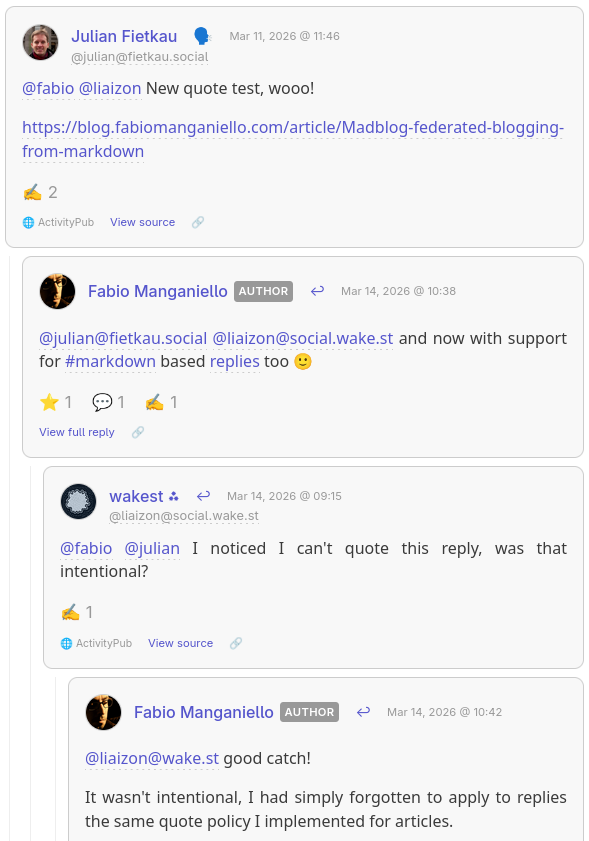
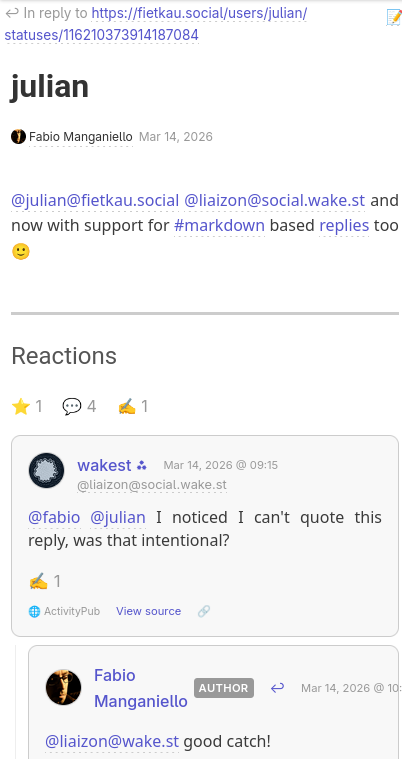
(I hope that @julian@fietkau.social and @liaizon@social.wake.st won't mind for using a screenshot from their conversation on my blog 🙂)
Remember to mention your mentions
An important implementation note: if you're replying to someone else's ActivityPub post, it's important that you also mention them in the reply, otherwise your reply will be rendered under their comment but they may not be notified.
Usually you don't have to worry about this on Mastodon because the UI will automatically pre-fill the participating accounts in a sub-thread when you hit Reply.
But this is something to keep in mind when your posts are just text files.
Your replies are articles in their own right
Even though anything under replies/ won't appear on your blog's home page, it doesn't mean that it must be rendered just like a humble rectangle in a crowded comments section.
By clicking View full reply you get redirected to a separate page where the reply is rendered as a blog article, and its comments section consists in the sub-tree of the reactions that spawned from that specific reply.
Liking Posts
Sometimes a reply is too much — you just want to show appreciation. Now you can "like" any post on the Fediverse with a simple metadata header.
Standalone likes
Create a file under replies/ with just a like-of header:
[//]: # (like-of: https://mastodon.social/@bob/987654321)
This publishes a Like activity to the Fediverse. Bob sees the notification,
and your blog records the interaction.
Like and comment
Want to like and say something? Combine both:
 [//]: # (like-of: https://mastodon.social/@bob/987654321)
 [//]: # (reply-to: https://mastodon.social/@bob/987654321)

This is such a great point! Bookmarking for later.

@bob@mastodon.social
Bob gets both the like and your reply as a threaded response.
Unlisted Posts
Not everything needs to appear on your blog's front page. Files under replies/ without reply-to and like-of headers become "unlisted" posts — they're published to the Fediverse but don't clutter your blog index.
Perfect for quick thoughts, threads, or conversations that don't warrant a full article.
 [//]: # (title: Thoughts of the day)

Quick thought: I've been experimenting with writing all my Fediverse posts
as Markdown files. It's oddly satisfying to `git log` my social media history.
Guestbook Replies
Your blog's guestbook works the same way. Reply to guestbook entries by placing files under replies/_guestbook/:
 [//]: # (reply-to: https://someone.blog/mention/123)

@alice@example.com welcome! Thanks for stopping by.
Editing and Deleting
Changed your mind? Edit the file and an Update activity is sent. Delete the file and your reply is removed from the Fediverse too.
Accidentally liked something? Remove the like-of line (or delete the file) and an Undo Like is published.
Your content, your rules.
Getting Started
- Enable ActivityPub in your
config.yaml:
link: https://blog.example.com
enable_activitypub: true
activitypub_username: blog

# Only specify these if you want your ActivityPub domain to be different from your blog domain
# activitypub_link: https://example.com
# activitypub_domain: example.com
- Install Madblog
- From
pip:
pip install madblog
- From Docker:
docker pull quay.io/blacklight/madblog
- Run Madblog from your Markdown folder (it is recommended that your articles are stored under
<data-dir>/markdown):
- From a
pipinstallation:
madblog /path/to/data
- From Docker:
docker run -it \
  -p 8000:8000 \
  -v "/path/to/config.yaml:/etc/madblog/config.yaml" \
  -v "/path/to/data:/data" \
  quay.io/blacklight/madblog
- Any text file you create under
markdown/becomes a blog article. Any text file you create underreplies/becomes an unlisted post, a reply or a like reaction.
Check the README for detailed configuration options.
Happy blogging!




















@fabio @liaizon New quote test, wooo!
https://blog.fabiomanganiello.com/article/Madblog-federated-blogging-from-markdown
@julian@fietkau.social @liaizon@social.wake.st and now with support for #markdown based replies too 🙂
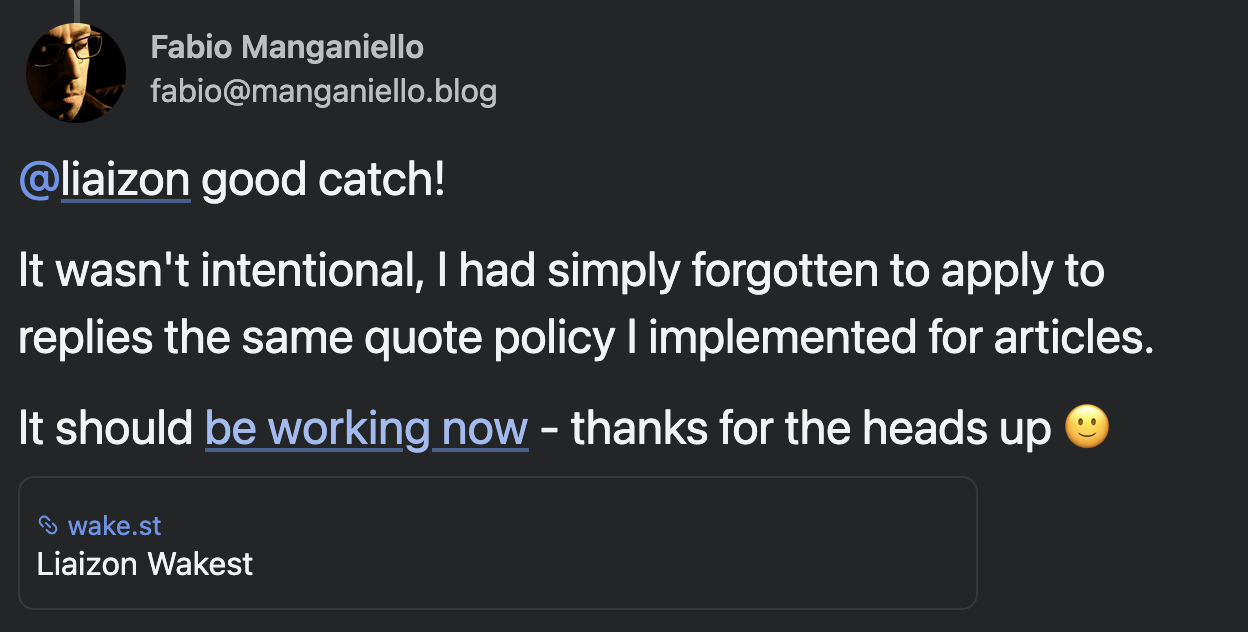
@liaizon@wake.st good catch!
It wasn't intentional, I had simply forgotten to apply to replies the same quote policy I implemented for articles.
It should be working now - thanks for the heads up 🙂

@fabio yay it looks like it works now!
another tiny bug I will note: the way you are adding my mention in your reply is causing mastodon to make a link preview for it. while I don't know what you need to do technically to disable it, I know its able to be done since they only show up like this for certain server softwares
 ⭐
⭐
@liaizon @fabio That one's a microformat mismatch, Mastodon looks for the class "mention" to skip the link preview and open the profile locally. https://docs.joinmastodon.org/spec/microformats/#mastodon
@fabio this is getting annoying, every time you save your site you are sending a new version of all your likes so this thread gets bumped to the top of my feed
@liaizon@wake.st I am very sorry about that.
This was a quite tricky bug to catch but I have probably squashed it.
You should have received at most only one additional like this afternoon and then not anymore (and I've already restarted the service multiple times). If you could confirm this then I'll put this bug to sleep 🙂
This was basically caused by Mastodon's implementation of tombstone events that forces me to re-create a different version of an activity if I decide to remove and re-create the reaction file with the same name.
But Mastodon interpreted that as a separate activity, so it ended up undoing and redoing the like upon initial sync.
Sorry again for the inconvenience.

@fabio why reinventing the wheel in such a complicate way?
Software like GtS allows domain splitting. My GtS, by example, runs under x.keinpfusch.net, but it responds for keinpfusch.net, which is my blog. Wvertyhing you need is to forward the traffic for the Webfinger, when it reaches the blog, to the AP backend, meaning GtS itself.
So basically you can have ablog on yourdomain.tld, and in the same time make the domain be recognized as an activitypub node with the first level domain.
you can find me in the fedivers using uriel@keinpfusch.net , despite of the fact the GtS is running on the x.keinpfusch.net . So LITERALLY EVERYTHING can be "federated" , the same way.
I mean, WebFinger protocol has the feature anyways. In the past I was doing the same also #snac2, using another feature, "path".
There are many ways to do this, why reinventing the wheel, precisely?